ORDERING & OPERATIONS FOR FOOD BUSINESSES

Your food business.
One simple platform.

Manage your online menu, accept customer orders, and track your sales from one easy-to-use workspace.

Built for restaurants, cafés, home kitchens, and neighborhood food businesses.

Free trial for eligible new stores. Set up your menu, confirm your email, then review and start your trial in your workspace. A paid plan is needed to keep taking orders after the trial. See trial and plan details
  • QR OrderingFor dine-in customers
  • Online OrdersPickup & delivery
  • Sales & ReportsTrack business performance
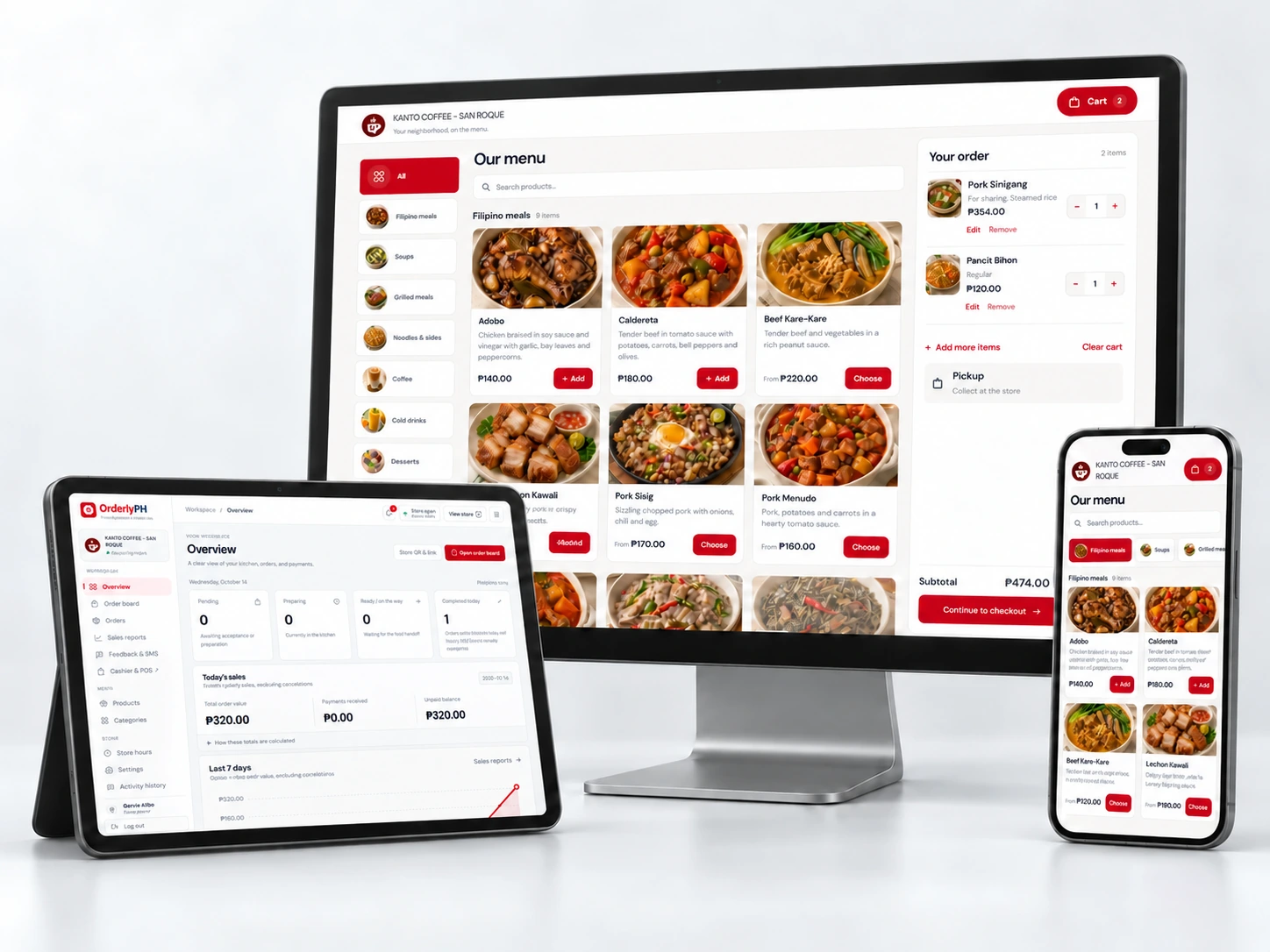
OrderlyPH dashboard on a tablet with the Kanto Coffee menu on a monitor and phone

On the devices you already use.

CafésCoffee shops & cafésRestaurantsFull-service restaurantsHome kitchensSmall food businessesFood stallsKiosks & pop-up storesRetail storesGroceries & everyday essentials
01 / ORDERING & GUEST EXPERIENCEOnline ordering & store tools

Make every
customer interaction easier.

A simple way to order, wherever your customers are.

01

At the table. On their phone.

Scan a table QR and choose variants or add-ons. No app needed.

02

Your storefront, beyond the table.

Pickup or delivery, with your own branding and delivery fees.
Explore the demo store
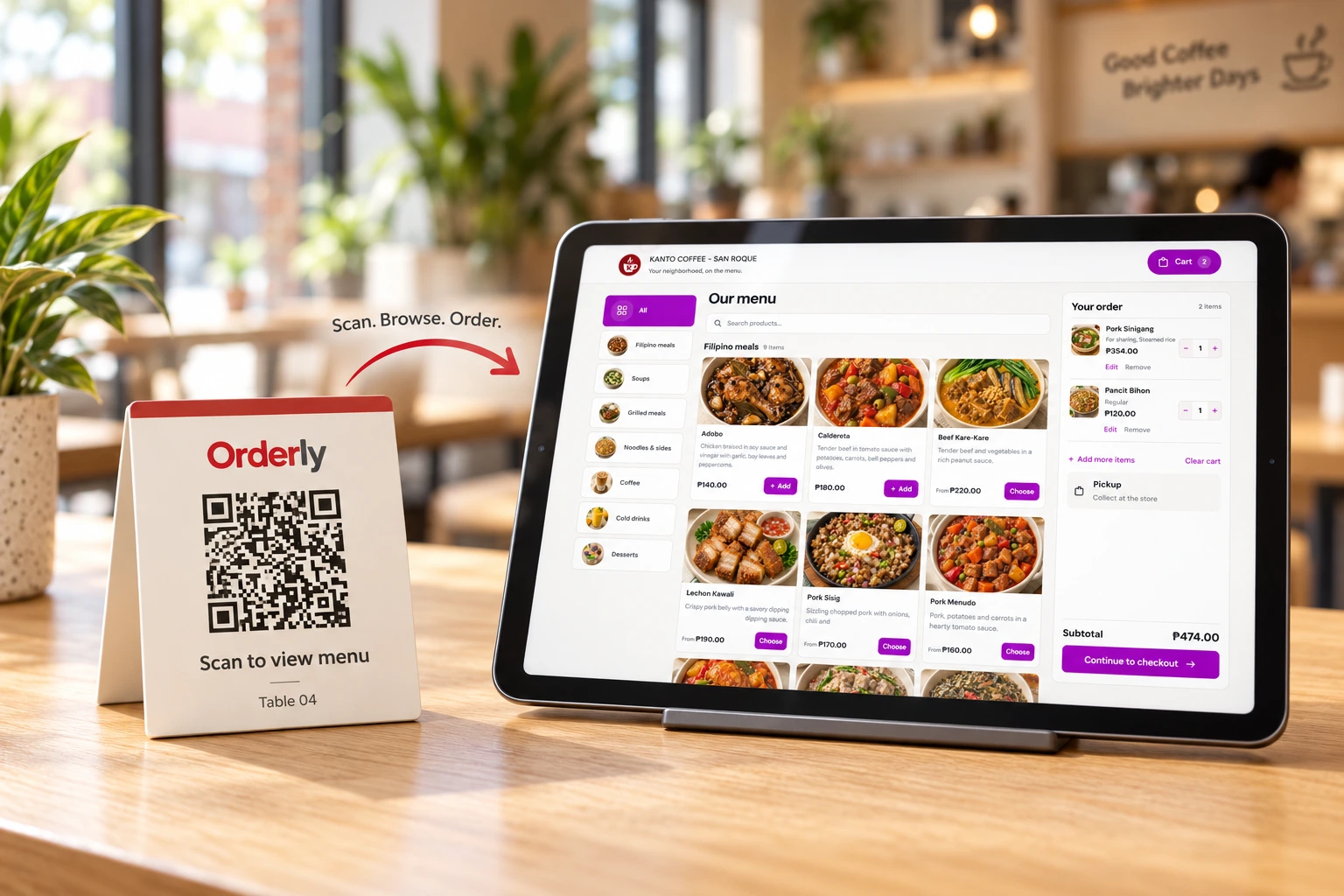
Table QR menu card beside the Kanto Coffee ordering menu on a tablet
A familiar menu. A few taps. Your order.
KEEP THE CONNECTION

Turn one good visit
into the next.

Rewards that feel personal

Reward return visits with points and coupons.

Know who comes back

Collect ratings, link to Google reviews, and save opt-in contacts. SMS sending is not connected yet.

THE TOOLS BEHIND YOUR STORE

Your business, in a clearer view.

Choose which tools appear in your navigation.

Keep your payments and costs organized.

See what you have collected and what you have spent.

  • Store-configured GCash, bank transfers, and cash.
  • Sales, ingredient costs, expenses, and accounting exports.
  • Subscription invoices and receipt approval on your Subscription page.

PayMongo and automated card payments are not connected. Subscription billing is separate from customer order payments.

PAYMENT WORKFLOW

Clear records.
Clear next steps.

  1. Customer places an order
  2. Store verifies cash or transfer receipt
  3. Payment status updates in the workspace

Payment methods depend on each store’s settings.

A LITTLE HELP TO GET STARTED

Scan your menu.
Make it your own.

Start with a menu photo or document, then make it your own.

Talk about menu setup
  1. 01

    Scan your menu

    Turn a photo or document into an editable product draft.

  2. 02

    Review the draft

    Check names, prices, categories, variants, and add-ons.

  3. 03

    Publish to your store

    Confirm the draft to add it to your store.

PREDICTABLE PLANS. ZERO ORDER COMMISSION.

A plan for your store.

A plan fee, without a cut from every OrderlyPH order.

Monthly or annual billing
TRY IT WITH YOUR OWN MENU

A free trial, when your store is ready.

Available to eligible new stores. Review your trial duration, included tools and eligibility in your workspace before starting. Registration and email confirmation do not start your trial.

  1. Set up your storePrepare your store details and at least 3 products. Preview your menu before creating your account.
  2. Confirm your emailOpen your confirmation email, confirm your address, then sign in.
  3. Review and activateOpen Subscription in your workspace, choose an eligible trial plan and select Start free trial.
Create your store

Your trial starts only after activation is confirmed. A paid plan is needed to continue new orders after it ends. There is no automatic charge or auto-renewal.

MONTHLY

Room to find your rhythm.

₱600/ month

Pay monthly as your business finds its flow.

  • Online menu, table QR & ordering
  • POS, inventory & sales reports
  • Staff access & accounting
  • Rewards, coupons & guest feedback
Ask about monthly
ANNUALSave ₱3,200 / year

Make it a good year.

₱4,000/ year

About ₱333/month, paid once for 12 months.

  • Everything in the monthly plan
  • 12 months with one payment
  • Menu setup assistance available
Ask about annual

How billing works

  1. Choose your billing cycleContact OrderlyPH to arrange your plan and receive an invoice.
  2. Pay and submit your receiptFollow the invoice instructions and upload proof on your Subscription page.
  3. Get confirmationAfter approval, your subscription dates update and you receive a notification. Request renewal from Subscription.

Payments are reviewed manually. There is no automatic card charge or auto-renewal.

Confirm usage limits and setup assistance before paying.

Payment provider and delivery charges are separate. Request the applicable refund terms before paying.

See what zero order commission could mean
YOUR ORDERS. YOUR EARNINGS.

A plan fee.
Never a cut of your orders.

Explore an illustrative comparison using your monthly sales and a commission rate you choose.

Your monthly comparisonILLUSTRATIVE ONLY
₱5,000₱150,000
At your selected rate ₱3,000OrderlyPH commission ₱0
Potential monthly difference
After the ₱600 monthly plan fee
₱2,400
Example only. Excludes other providers’ plan fees and any payment or delivery fees. Actual savings depend on your costs.
BEFORE YOUR NEXT CHAPTER

Good questions.
Clear answers.

Tell us about your store.
We’ll talk through what fits.

Talk to OrderlyPH
How does the free trial work?

Eligible new stores can start a free trial after setup and email confirmation. Registration needs your store details and at least 3 products. Once signed in, open Subscription to review your trial duration, included tools and eligibility. Choose an eligible trial plan and select Start free trial. The trial starts only after activation is confirmed. A paid plan is needed to keep taking new orders after it ends. There is no automatic charge or auto-renewal.

Do you take commission on every order?

OrderlyPH charges a plan fee with 0% order commission. Separate payment-provider and delivery charges may apply.

Can you help set up our menu or catalog?

Yes. Share your products, prices, and photos for setup assistance, or add them yourself. Confirm the scope of assistance before subscribing.

Do customers need to download an app?

No. Customers browse and order in their phone’s browser through your store link or QR code.

Can I simplify my admin menu?

Yes. In store settings, choose which optional sections appear in your navigation. Hiding a section does not disable an included feature or change staff permissions.

How do payments and renewals work?

OrderlyPH creates an invoice. Follow its payment instructions and submit your receipt on your Subscription page. After manual approval, your subscription dates update and you receive a notification. You can request renewal from Subscription. There is no automatic charge.

What happens when my subscription expires?

After any assigned grace period, an expired or suspended subscription blocks new orders. Contact OrderlyPH to arrange renewal.

What are the refund terms?

Request the applicable refund terms from OrderlyPH before paying. This website does not promise a trial refund or money-back guarantee.

READY TO GET STARTED?

Make room for
better service.

Set up your menu and share your store link.

Create your store
GIVE IT A TRY

A little taste of OrderlyPH.

Interactive walkthrough with sample data. No real order or payment is created.

S

Sinta Café

A sample menu for your neighborhood favorite.

Chicken rice bowl

Chicken bowl

Grilled chicken, rice, and fresh greens.

₱120
House coffee

House coffee

Freshly brewed for your favorite meal.

₱90

Your sample order

Your order is empty. Add something delicious.

Total ₱0

About this website

The landing-page demo uses temporary sample data and does not submit orders or payments. Registration saves your account details, store information, and uploaded photos after final submission. Login uses an account session cookie. Setup drafts are kept in the current browser tab without your password.

Registration, verification-email resend, and password recovery use Cloudflare Turnstile to prevent automated abuse. Cloudflare processes browser and network information for this security check under its privacy policy. OrderlyPH stores limited security events and temporary rate-limit signals to protect accounts, with a configurable security-event retention period of 30 days by default.

Facebook links open the OrderlyPH Page on Facebook, where that service’s privacy rules apply. This website does not include Meta Pixel, Conversions API or other third-party analytics. OrderlyPH measures public page loads using keyed IP hashes and daily page counts, retained for up to 90 days. Raw IP addresses and query strings are not stored in visitor analytics. Shared networks can count several people as one visitor. These aggregate reports are visible only to platform administrators. Where optional campaign measurement is enabled, Privacy choices lets you allow campaign labels to be kept in this browser tab for up to 7 days and attached to your registration. Registration, email verification, store activation, own-menu readiness and owner-confirmed real customer usage are compared internally for up to 90 days. Declining does not affect setup or trial access. No advertising cookies or click IDs are collected. Signed-in owners can remove saved campaign details through Privacy choices in their workspace. Deleted accounts and expired measurement records are excluded from reports.

Contact OrderlyPH for the applicable privacy and refund terms before subscribing.